Remove Windows 10 Built in Apps using PowerShell
Some apps can be easily uninstalled through the normal way using the windows control panel . Search control panel by pressing windows key and typing control panel or press window key + X, new window will pop up and then select Apps and Features . Simply right click on the app and then uninstall them. On touch sensitive screens you need to long press on the app icon and the same menu will appear, where you need to tap uninstall. This trick helps to uninstall these apps – Get Started, Get Office, Get Skype, Money, Phone Companion, Solitaire, News, Sports, Bloatware apps that come with every device by the manufacturer.
But some inbuilt apps are not easy to uninstall. In this case method is useful to remove / uninstall / reinstall an inbuilt or default apps / software of Windows 10.
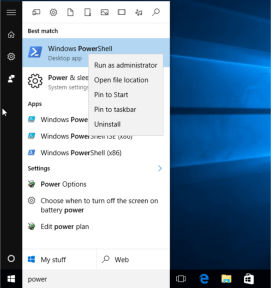
Windows PowerShell lets you uninstall many other apps with the exception of Microsoft Edge. Open the start menu, Search PowerShell and then run this program as an administrator. Just right click on the program and select the option.
You can also press Ctrl+shift+enter to run it as an administrator. PowerShell responds to specific commands for particular apps. You can utilize the Get-AppxPackage or Remove-AppxPackage commands to remove the built-in apps from Windows 10. If you want to delete an app, then in addition to these commands you will also need to provide info such as PackageFullName (the full package name of the relevant app).
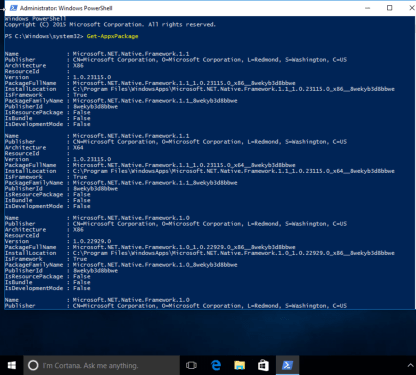
Run the following command to get a list of all installed apps in Windows 10
Get-AppxPackageThis command will display all the installed apps with all their specific details and their full names which we require to uninstall them. We need the PackageFullName of the relevant apps so we run the following command to find out their names:
Get-AppxPackage | Select Name , PackageFullName
This command will show the name of the app and the PackageFullName and omit the undesired information.
To remove all inbuilt / default app from all user accounts in win 10
Get-AppxPackage -AllUsers | Remove-AppxPackageTo remove all modern apps from system account
Get-AppXProvisionedPackage -online | Remove-AppxProvisionedPackage -onlineUse the following commands to remove a specific app:
Uninstall Skype app
get-appxpackage *messaging* | remove-appxpackageUninstall Sway
get-appxpackage *sway* | remove-appxpackageUninstall Phone:
get-appxpackage *commsphone* | remove-appxpackageUninstall Phone Companion:
get-appxpackage *windowsphone* | remove-appxpackageUninstall Phone and Phone Companion apps together:
get-appxpackage *phone* | remove-appxpackageUninstall Calendar and Mail apps together:
get-appxpackage *communicationsapps* | remove-appxpackageUninstall People:
get-appxpackage *people* | remove-appxpackageUninstall Groove Music:
get-appxpackage *zunemusic* | remove-appxpackageUninstall Movies & TV:
get-appxpackage *zunevideo* | remove-appxpackageUninstall Groove Music and Movies & TV apps together:
get-appxpackage *zune* | remove-appxpackageUninstall Money:
get-appxpackage *bingfinance* | remove-appxpackageUninstall News:
get-appxpackage *bingnews* | remove-appxpackageUninstall Sports:
get-appxpackage *bingsports* | remove-appxpackageUninstall Weather:
get-appxpackage *bingweather* | remove-appxpackageUninstall Money, News, Sports and Weather apps together:
get-appxpackage *bing* | remove-appxpackageUninstall OneNote:
get-appxpackage *onenote* | remove-appxpackageUninstall Alarms & Clock:
get-appxpackage *alarms* | remove-appxpackageUninstall Calculator:
get-appxpackage *calculator* | remove-appxpackageUninstall Camera:
get-appxpackage *camera* | remove-appxpackageUninstall Photos:
get-appxpackage *photos* | remove-appxpackageUninstall Maps:
get-appxpackage *maps* | remove-appxpackageUninstall Voice Recorder:
get-appxpackage *soundrecorder* | remove-appxpackageUninstall Xbox:
get-appxpackage *xbox* | remove-appxpackageUninstall Microsoft Solitaire Collection:
get-appxpackage *solitaire* | remove-appxpackageUninstall Get Office:
get-appxpackage *officehub* | remove-appxpackageUninstall Get Skype:
get-appxpackage *skypeapp* | remove-appxpackageUninstall Get Started:
get-appxpackage *getstarted* | remove-appxpackageUninstall 3D Builder:
get-appxpackage *3dbuilder* | remove-appxpackageUninstall Microsoft Store (Windows apps store):
get-appxpackage *windowsstore* | remove-appxpackage
Comments
Post a Comment